Getting Started on RentSpree as an Agent-Referred Landlord
Your agent set up everything to get you started. Here's your home base for the whole move-in journey from reviewing applicants to collecting rent.
⚠️ The Rental Hub is currently in beta testing. This feature and it's functionality may look different based on your account, or may not appear for you just yet. We plan to release this feature to all users in the coming weeks.
If your real estate agent just sent you a link to review an applicant, welcome to RentSpree. That link brings you to your Rental Hub: a workspace your agent set up on your behalf. From here, you can review applicants, set up a lease, connect a bank account, and track your progress toward your first rent check. This article walks you through everything you'll see and do from the moment you arrive.
Step 1: Open the link in your agent's email
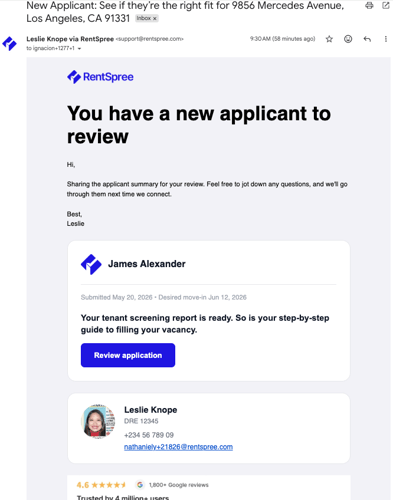
Your agent sent you an email notice regarding a new applicant with a single button: Review application. Click it. You'll land directly in your Rental Hub, not on the application itself. That's intentional. Your Hub is where everything lives, and the application is waiting there for you.

Step 2: Create your account (first time only)
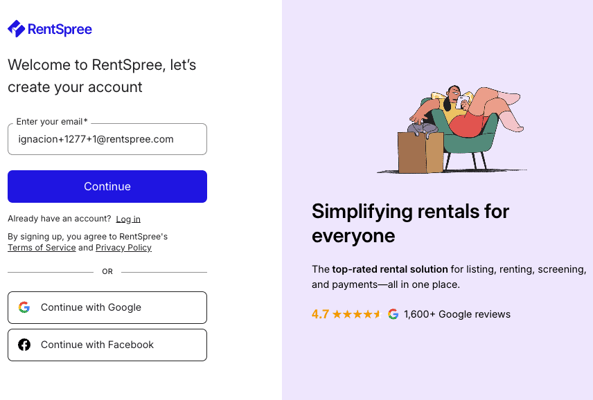
If this is your first time using RentSpree, you'll be asked to create an account. Your email address will already be filled in. Just set a password and you're in. If you've been here before, you'll skip straight to your Hub.

Step 3: See your Rental Hub for the first time
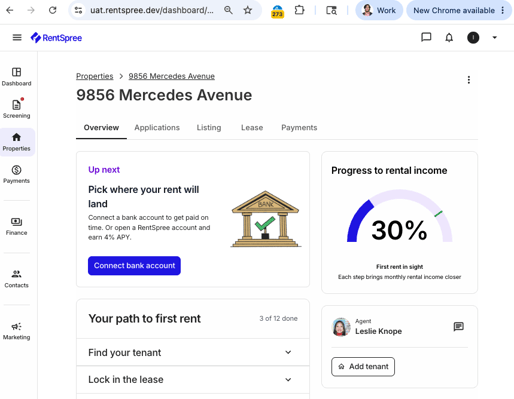
Your Hub is a workspace that tracks where you are in the move-in process and tells you exactly what to do next. Four things to notice when you first land:
- Your next action (top center). A single prompt, written in your agent's voice, telling you the one thing to do right now. Nothing else competes for your attention.
- Your path to first rent (center). A 12-step move-in checklist grouped into four phases: Find your tenant, Lock in the lease, Get paid, and Hand over the keys. Some steps belong to your agent. Most of the others are available now — you can get a head start on them whenever you're ready.
- Your move-in progress (right). A score showing how far along you are. You start at 20% — because your agent already handled the first two steps, listing your property and collecting applications, before you ever logged in.
- Your agent (right). Your agent's profile is right there on your Hub. Use the Message button to reach out to them directly without leaving your workspace.

You don't have to figure out what to do next. the Rental Hub surfaces one action at a time. Finish what's in front of you, and your next step will appear automatically.
Step 4: Accept the screening agreement (first time only)
When you click into the applicant review for the first time, you'll be asked to accept a one-time service agreement with TransUnion, the credit bureau behind the screening reports. This is a legal requirement for accessing applicant data. Once you accept, you'll never see it again.
Step 5: Review your applicant
The first time you click Review applicants, a brief two-screen intro walks you through how the process works. It takes about a minute. After that, you land on the applicant's full application — credit, background, and rental history all in one view.
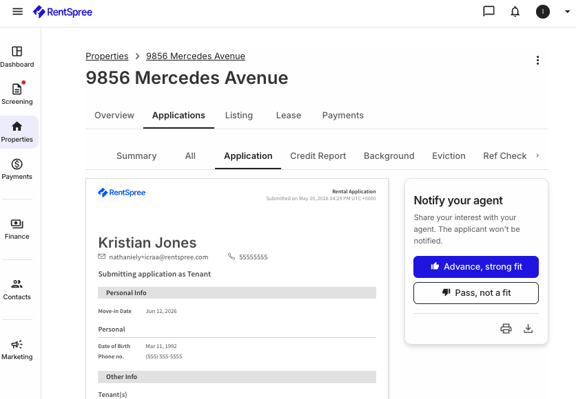
On the right side of the screen, you'll see a Notify your agent panel. You have two options:
- Advance, strong fit. You like what you see. Your agent is notified.
- Pass, not a fit. You'd like to move on. Your agent is notified.
Your rating goes only to your agent. The applicant is not notified either way. This is a private signal — your read on the application, shared directly with the person helping you fill the vacancy.

A credit score is a starting point, not the whole story. Income-to-rent ratio matters too. Most landlords look for monthly income that's at least 3x the rent. Rental history, time at their current job, and how the applicant presents themselves in writing all add context. A solid credit score with a string of late payments tells a different story than a lower score with a clean track record.
Step 6: Back to your Hub, one step further along
After you rate the applicant, you're returned to your Hub. Three things will have changed:
- The Review applicants step is checked off on your move-in map.
- Your progress score has advanced to 30%.
- A new next action has appeared, pointing you toward your next step which is typically connecting a bank account so you're ready to receive rent.
Each time you complete a step, your Hub updates and surfaces what comes next. You don't need to figure out where to go. It's already queued up.

From here, your Rental Hub will guide you through the rest of the move-in process: lease setup, bank account connection, and rent collection. One step at a time, your agent can also see your progress along the way.