How to update or edit your listing
Need to make a change? Here's how to update your listing and what to expect afterward.
Whether your rent amount has changed, you want to swap out photos, or your listing has expired and needs to be reactivated, updating your RentSpree listing is straightforward. Just keep in mind that any edit — no matter how small — sends your listing back through the Trust & Safety review process before it goes live again.
How to edit your listing
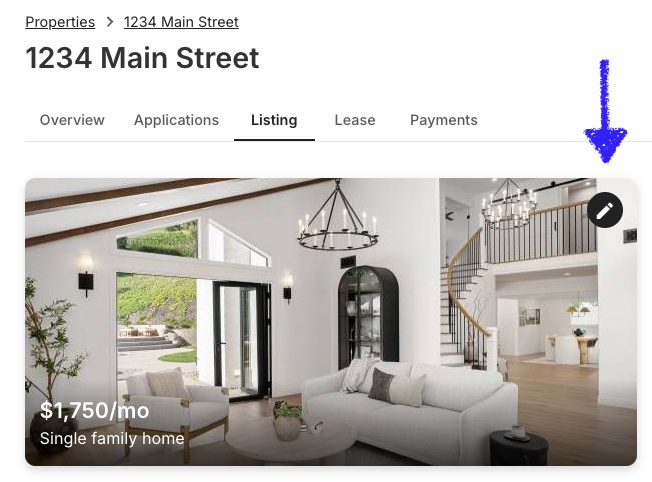
Navigate to your property and click the Listing tab. From there, select the Pencil Icon to edit your listing's details and make any changes you need. When you're done, save and resubmit for publication.

What you can update
You can edit any part of your listing at any time, including:
- Property basics — Core details like rent amount, available date, number of bedrooms and bathrooms, and property type.
- Your contact info — How you'd like prospective renters to reach you.
- Lease terms — Lease length, start date, and whether you're open to month-to-month arrangements.
- In-unit amenities — Features inside the unit itself, like washer/dryer, dishwasher, air conditioning, and heating.
- Property features — Characteristics of the property as a whole, such as a yard, balcony, or garage.
- Shared amenities — Communal features available to all residents, like a pool, gym, or laundry room. Particularly relevant for multi-unit properties.
- Parking — Whether parking is available, what type, and any associated costs.
- Pets — Your pet policy, including which animals are allowed and any restrictions or deposits.
- Policies — Additional rules and requirements such as smoking policy, security deposit, and move-in fees.
- Description — The written summary of your property that renters read on your listing.
- Photos — Add, remove, or reorder your listing photos.
- Video tour — Upload or update a video walkthrough of your property.
Every edit triggers a new review
This is the most important thing to know about editing your listing: any change you make — even a minor one — sends your listing back through Trust & Safety review before it goes live again. The review typically takes 24–48 hours, during which your listing will not be visible on partner sites.
Timing matters. If you're actively receiving applications and want to make a small update, be aware that your listing will go offline during the review period. Consider batching any changes together rather than making multiple small edits at separate times as this minimizes the total time your listing spends offline.
Reactivating an expired listing
RentSpree listings stay active for 45 days. After that, your listing is automatically set to inactive and removed from partner sites. When this happens, RentSpree will send you an email with instructions to reactivate.
To reactivate, simply open your listing, make at least one update — even a small tweak to your description or a refreshed photo — and resubmit. Your listing will go back through the 24–48 hour Trust & Safety review and then go live again.
Use reactivation as a reset. If your listing has been active for 45 days without finding the right tenant, that's useful feedback. Before reactivating, take a fresh look at your rent price compared to similar properties in your area, consider adding better photos, and update your description. A refreshed listing often brings a new wave of interest — renters who may have scrolled past it the first time around.
Didn't get the reactivation email? Check your spam folder. If your listing has gone inactive and you can't locate the email, you can also go directly to the Listing tab on your property and resubmit from there.
Deactivating your listing
Once you've found a tenant and no longer need your listing to be active, you can deactivate it manually from the Listing tab. This removes it from all partner sites and stops new applications from coming in.
Found your tenant? Take the listing down promptly. Leaving a listing active after you've selected a tenant means other renters may still apply, raising expectations you won't be able to meet. It's a small but considerate step that keeps your reputation as a landlord in good standing.