
C.A.R. members can build a California Association of Realtors (C.A.R.) residential lease and send it for e-signature from RentSpree at no cost. You’ll need a valid C.A.R. membership.
How your membership is validated
If you joined RentSpree through your MLS, your membership is verified automatically through single sign-on (SSO). If you’re prompted, select Verify C.A.R. membership and log in to your C.A.R. account once to confirm.
If you signed up for RentSpree directly, you’ll enter your last name, brokerage, and NRDS ID before sending your first lease. It’s a one-time step.
How to build and send a C.A.R. lease
Go to the Properties tab and select the California property you’re setting up a lease for.
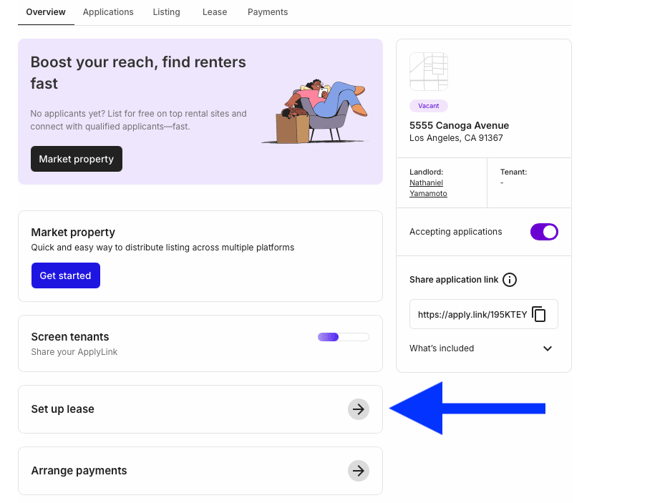
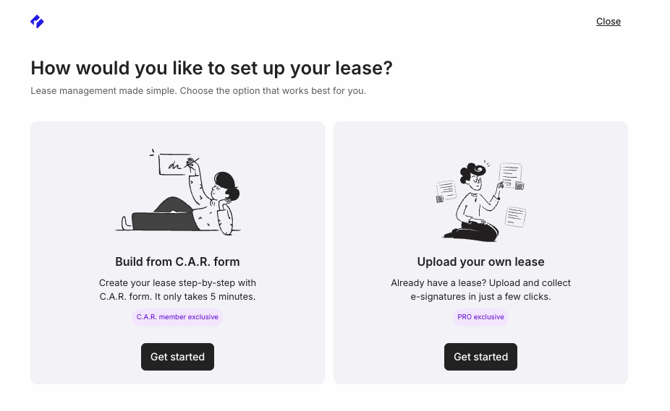
On the property overview page, select Set up lease, then under Build from C.A.R. form select Get started.
Enter the agent, brokerage, landlord, tenant, and any guarantor or tenant’s agent information so the lease is set up correctly.
Set the lease terms: fixed-term or month-to-month, the dates, rent amount and due date, late fees, move-in fees like the security deposit and prorated rent, how rent will be collected, and renter insurance requirements.
Add property details: parking and storage, keys, utilities, garden and pest control responsibilities, and whether a homeowners’ association manages the property.
Include disclosures and addenda. The lease supports the bedbug disclosure, Fair Housing and Discrimination Advisory, California Consumer Privacy Act advisory, tenant flood hazard disclosure, and the rent cap and just cause addendum.
Review any incomplete areas and the PDF preview, then send the lease to everyone for signature, or to the tenants first. You’re notified once it’s signed.
Not a C.A.R. member? Set up and send a lease for e-signature covers uploading your own lease instead.